


A supplier sends new banking details. An owner appears on a video call and asks for an urgent transfer. An employee downloads a free AI tool. A new remote worker asks for access to customer files.
Article Contents
None of these requests seems unusual. That is what makes them dangerous.
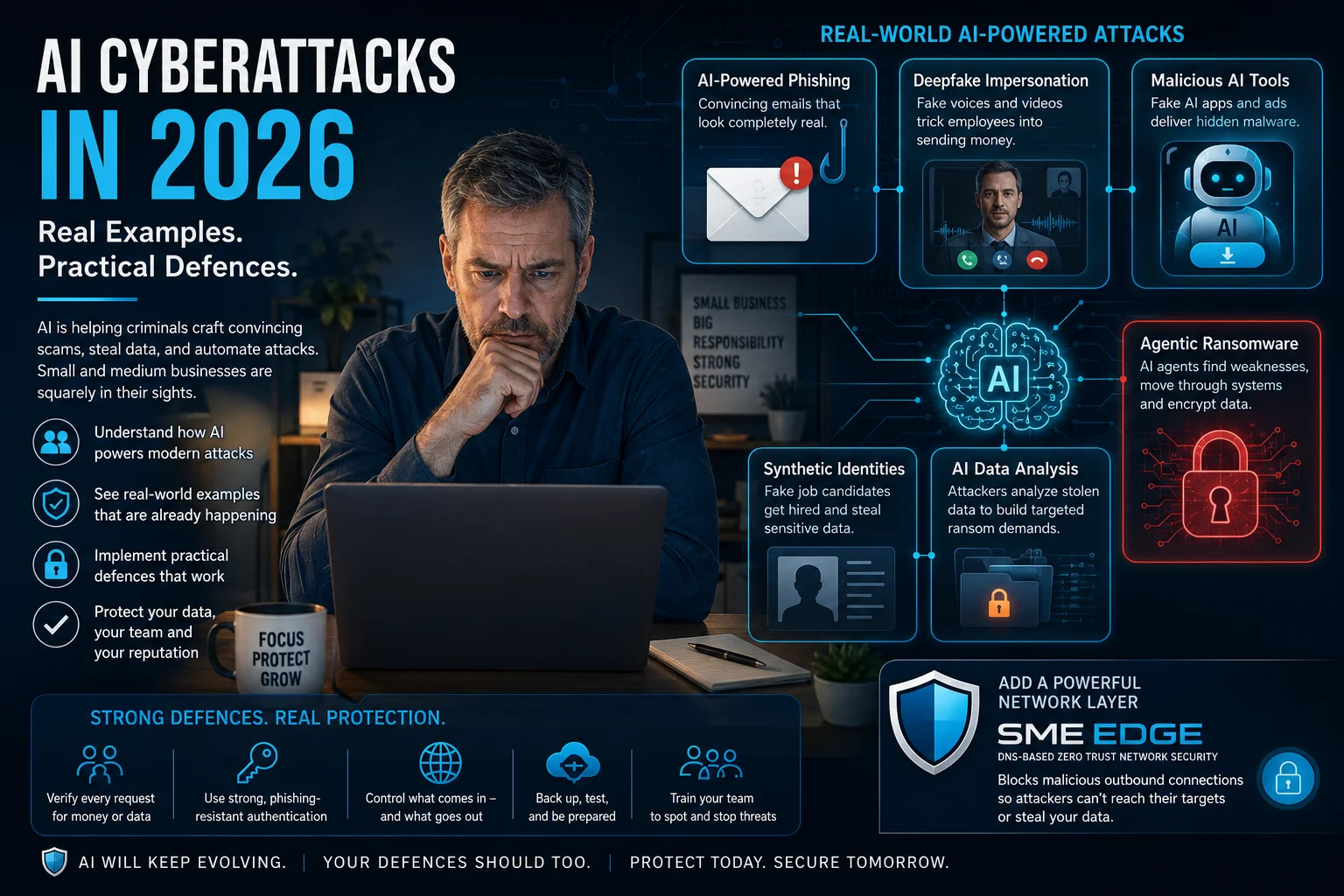
Artificial intelligence is helping criminals create more believable emails, documents, websites, voices and videos. It can also help them research a company, study stolen information and move more quickly through a cyberattack.
The important point for business owners is simple: a request can look and sound completely real and still be fraudulent.
Businesses should not rely on an employee spotting a fake. Payments, account changes, software installations, login approvals and requests for sensitive information need clear verification procedures of their own.
What AI changes for small and medium-sized businesses
Most cyberattacks are still directed by people. AI makes those people faster, more convincing and able to operate at a larger scale.
A criminal can use information from a company website, social-media profile or job posting to identify employees, decision-makers and software systems. If an email account is compromised, AI can quickly summarize years of conversations, identify upcoming payments and imitate the writing style of a supplier or executive.
It also reduces language barriers. A criminal can produce polished messages for employees, suppliers and customers in several languages without being fluent in any of them.
Traditional warning signs such as poor grammar, an unusual tone or an obviously fake document are becoming less reliable.
Three ways criminals use AI
1. AI helps a person carry out an attack
A criminal may use AI to research a business, write a phishing email, translate a message, summarize stolen documents or improve malicious software.
The person remains in control, but AI helps them produce more convincing work in less time.
2. AI creates the fake material
AI can generate the content used in the fraud, including:
- Fake invoices and payment instructions
- Cloned voices
- Synthetic videos
- Forged identity documents
- Fraudulent websites
- Malicious computer code
The employee sees the finished result, not how it was produced.
3. AI carries out more of the attack itself
In newer attacks, an AI system may be given a goal and allowed to work through several steps. It can try an action, review the result, correct mistakes and continue.
These more automated attacks are still less common than ordinary phishing and fraud, but real cases have now been documented.
Real examples and the lessons for business owners
A supplier changes its banking details
An email arrives inside a real conversation about a real invoice. It includes the correct project, amount and payment date. The supplier says it has changed banks and attaches professional-looking payment instructions.
The bookkeeper calls the number in the new email signature. A helpful accounts representative confirms the change.
The payment is sent to the criminal.
Fraudsters may gain access to genuine email conversations or study public information before impersonating a supplier. AI can help them identify the next payment, copy the supplier’s tone and prepare believable answers to likely questions.
Calling the number in the suspicious email does not provide independent verification. The number may belong to the criminal.
Business rule: Never create or change payment instructions based only on an incoming email, message, call or video meeting. Verify the change using contact information already stored in the company’s records and require approval from a second authorized person.
The same rule should apply to payroll changes, customer refunds and new payees. Owners and executives must follow it as well.
A familiar face asks for a transfer
In 2024, an employee at engineering firm Arup joined a video meeting with people who appeared to be the company’s chief financial officer and other senior colleagues.
The meeting was fake. Criminals had used digitally generated voices and images. The employee was persuaded to transfer approximately USD $25 million.
A smaller business could face the same method on a smaller scale. A cloned owner may leave a voicemail requesting a deposit. A manager may appear on a short video call and ask payroll to release employee information. A customer may appear to confirm an unusual refund.
Business rule: A familiar voice or face can begin a conversation. It cannot approve a payment or release sensitive information.
End the original interaction. Call the requester using a known number, confirm the purpose and amount, and involve a second approver.
A free AI tool steals business passwords
An employee sees an advertisement for a free AI video generator. The website looks professional and appears to represent a known service. The employee enters a prompt, waits for the result and downloads the file.
The download is malicious software.
Google’s Mandiant researchers documented a campaign in 2025 involving more than 30 fraudulent AI websites. The sites behaved like real tools, including prompts and loading screens, before offering an infected download.
The malware could steal passwords, browser information, credit-card details and access to accounts that were already signed in.
Employees are more likely to take this risk when they are simply trying to finish a normal task quickly.
An approved-software process should clearly explain:
- Which AI tools and browser extensions are permitted
- Whether software installation requires approval
- What company or customer information may be uploaded
- How to request a new tool
- Where approved software should be downloaded
The approval process must also be practical and timely. Employees will look for shortcuts when legitimate requests take too long.
A fake meeting turns an audio problem into malware
A business contact schedules a video meeting. The meeting platform looks legitimate, and a senior executive appears on screen. The audio does not work properly.
The employee receives troubleshooting instructions and is told to paste a command into the computer. The command installs malware.
Google’s Mandiant team documented this type of attack in 2026. The fake technical problem gave the victim a reason to follow instructions that would otherwise have seemed unusual.
Business rule: Employees must never paste commands into PowerShell, Command Prompt, Terminal or a Run window based on instructions received during a meeting, call, chat or webpage.
Normal meeting troubleshooting may involve changing a microphone setting, reconnecting or calling the company’s IT provider. It should not involve pasting unfamiliar commands into the operating system.
A remote employee uses a false identity
A candidate submits a strong résumé, performs well in the interview and provides identification that appears valid. After being hired, the worker receives access to email, customer files and internal systems.
The identity is fabricated.
Microsoft has documented remote worker operations that used AI-generated profile images, face-swapping, voice-changing tools and AI assistance during job applications and interviews.
A fraudulent worker may perform real day-to-day tasks while concealing their identity, location and purpose. Legitimate access can then be used to collect information or seek broader permissions.
Remote hiring should include:
- Independent identity verification
- References contacted using independently sourced information
- Company-controlled equipment
- A separate account for each worker
- Limited access during onboarding
- Additional access only when the role requires it
A new employee should not receive access to every system on the first day.
AI helps criminals understand stolen information
When criminals steal a large collection of company files, they still need to understand what they have. AI can quickly identify important customers, sensitive employee records, legal disputes, financial information and documents that may create the most pressure.
Anthropic reported disrupting an operation that used AI throughout a data-theft and extortion campaign against at least 17 organizations. AI helped with research, intrusion, selection of data to steal and preparation of tailored ransom demands.
Backups are essential, but they do not solve the problem of stolen information. Businesses should also:
- Restrict access to payroll, legal, financial and customer records
- Delete information that is no longer required
- Review which outside applications can access company files
- Watch for unusually large downloads or exports
- Remove unused accounts and integrations
AI carries out a longer technical attack
In July 2026, the Sysdig Threat Research Team reported an attack called JADEPUFFER, which it classified as the first documented agentic ransomware operation.
The attack entered through a known software vulnerability in an internet-facing AI application. Once inside, the AI system searched for passwords and cloud credentials, tried to reach other systems, corrected its own errors and eventually damaged production data.
The technology was new, but the weaknesses were familiar:
- A known security update had not been installed
- A public application could reach sensitive internal systems
- Passwords and credentials were stored in the environment
- Administrative access was poorly separated
The lesson is not that every business needs to become an AI security expert. It is that ordinary weaknesses can now be exploited more quickly and consistently.
Practical protections for small and medium-sized businesses
The most effective controls focus on the action being requested, not on whether an employee can prove that an email, voice or video was created by AI.
Put payment verification in writing
Every supplier banking change, payroll change, unusual refund and new payee should be verified through an established contact method.
Require two approvals for higher-risk or first-time transactions. Consider a short waiting period before paying a newly added account. Confirm important changes using the supplier’s previous contact information.
Employees must have clear authority to pause an urgent request, including one that appears to come from the owner.
Train employees around specific actions
Employees should pause when a request involves urgency combined with money, confidential information, account access or software installation.
Training should explain exactly what to do:
- Verify payment instructions using stored contact information
- Open important websites through a known bookmark
- Report unexpected login approval requests
- Send unusual requests for sensitive information to a manager
- Contact IT before installing unfamiliar software
- Refuse commands supplied during calls, meetings or chats
Training based mainly on spelling mistakes and awkward grammar is no longer enough.
Protect the accounts that unlock everything else
Email, banking, accounting, payroll, cloud administration, domain registration and remote access should use the strongest authentication available.
Passkeys or physical security keys provide stronger protection for owners, administrators, finance employees and other high-value users because they are tied to the genuine website.
Every employee should have an individual account. Former employees should be removed promptly. Administrator accounts should be separate from everyday email and web browsing.
Know what is exposed to the internet
Ask the company’s IT provider for a plain-language list of internet-accessible systems, including:
- Websites and hosting panels
- Firewalls and remote-access services
- File-transfer systems
- Databases
- Cameras and connected equipment
- Development and AI workflow tools
- Administration pages
Each system should have a business purpose, a responsible owner and a defined update process. Public access should be removed when it is not required.
Control AI tools, applications and browser extensions
Keep a manageable list of approved tools. Review an application before connecting it to company email, files, calendars or customer systems.
Employees should not install software from an advertisement or paste commands provided by a chatbot, webpage, caller or meeting participant.
Remove access for applications that are no longer used. Old integrations can remain connected to company systems long after their original purpose has been forgotten.
Limit access before an account is stolen
Employees, contractors and applications should receive only the information and permissions required for their work.
Separate payroll, finance, legal and customer records. Review access when roles change. Remove old accounts and unused applications.
A stolen account with limited access creates a smaller incident.
Control outbound network connections
No security system catches every bad click, stolen password or vulnerable application. Many attacks still need to connect to an outside server to receive instructions, download more malware or send stolen information.
Egress control manages these outbound connections.
Nerds On Site’s SME Edge uses DNS-based Zero Trust networking to block many unapproved outbound connections by default. Its Don’t Talk To Strangers® technology requires destinations to be verified through an approved DNS request or specifically allowed by policy.
This can place another barrier between a compromised device and the criminal’s infrastructure. It complements, rather than replaces, patching, endpoint security, strong authentication, limited access and backups.
Keep backups separate and test them
Maintain several backup copies, including at least one that ordinary employee and administrator accounts cannot easily change or delete.
Test a real restoration. Record how long it takes and which systems must be restored first.
A successful backup notification does not prove that the business can recover its accounting system when it is urgently needed.
Prepare a one-page incident plan
The plan should answer:
- Who calls the bank?
- Who calls the IT provider?
- Who can disable an account?
- Who contacts the insurer and legal adviser?
- Who communicates with employees or customers?
- Where are offline contact details stored?
- Who can make urgent decisions?
Keep a printed copy. Email and shared drives may be unavailable during an incident.
The 15-minute owner security check
A business owner should be able to answer these questions without reading a technical report:
- Can one employee change supplier banking details without a second approval?
- Would employees independently verify an unusual request from the owner?
- Are email and finance accounts protected with strong multi-factor authentication?
- Do the most important accounts support passkeys or security keys?
- Can employees install any AI tool or browser extension they find?
- Does the company know which systems are accessible from the internet?
- Can a public website or application reach sensitive company data?
- Can one employee account access most company files?
- Are outbound network connections restricted to trusted destinations?
- When did the company last restore a real system from backup?
- Who can disable accounts outside normal business hours?
- Are emergency contact details available offline?
An uncertain answer identifies the next task.
Turn the unknowns into a practical plan
A professional security assessment can identify gaps, rank them by business risk and turn them into a manageable work plan.
The Nerds On Site Cyber Security Snapshot reviews the network, data, devices, user accounts, employee awareness, cyber-insurance readiness, dark-web exposure, and email and web security. The findings are presented in plain language with recommended improvements and an implementation plan.
Nerds On Site can also help carry out the improvements, including account protection, policies, backups, network security and SME Edge.
Request a Cyber Security Snapshot
What to do after an incident
After a fraudulent transfer
Call the financial institution immediately and ask it to freeze, stop or recall the payment.
Then contact local police and report the incident to the Canadian Anti-Fraud Centre.
Fast reporting can make a difference. In January 2026, a Canadian business quickly reported a CAD $1.7 million spear-phishing transfer. The Canadian Anti-Fraud Centre, financial institutions and the United States Secret Service intercepted the transfer before the funds could be dispersed further.
Preserve:
- Original emails and attachments
- Email headers
- Payment instructions and account numbers
- Telephone numbers
- Meeting invitations and chat records
- Transaction confirmations
Do not delete messages or continue negotiating with the suspected criminal without professional advice.
After an account compromise
Contact the IT provider through a known number.
The response should include:
- Reviewing active login sessions
- Changing affected credentials
- Removing fraudulent email-forwarding rules
- Checking newly added devices and authentication methods
- Reviewing administrator changes
- Checking connected applications
A password reset alone may not remove an attacker who has stolen an active browser session or added another authentication method.
After a malware infection
Disconnect the affected device from the network.
Do not immediately wipe the device, reinstall the operating system or delete files. Those actions may destroy evidence needed to determine what happened.
Contact the IT provider, cyber insurer and incident-response partner. Other devices and accounts connected to the affected employee should also be reviewed.
Frequently asked questions
Are most cyberattacks now run by AI?
No. Most attacks are still directed by people.
AI is mainly being used to improve research, phishing, impersonation, malicious software and analysis of stolen data. Newer automated attacks show that AI can carry out longer technical sequences, but they have not replaced ordinary phishing, stolen passwords and unpatched software.
Can employees learn to spot a deepfake?
Employees can learn common warning signs, but visual inspection should not determine whether a payment or data request is approved.
A poor internet connection can make a real person look artificial, while a convincing fake can survive a short call. Independent verification works in both situations.
Is ordinary multi-factor authentication still useful?
Yes. Any multi-factor authentication is better than a password alone.
Passkeys and physical security keys offer stronger protection for important accounts because they are connected to the genuine website and are more resistant to copied login pages.
Should a small business ban AI tools?
A complete ban may push employees toward personal accounts and unapproved services.
A better approach is to approve a manageable group of tools, define what information employees may enter and review integrations before connecting them to company systems.
Does a business need AI-specific cybersecurity software?
Some organizations may benefit from advanced detection tools. Most small and medium-sized businesses will gain more by first improving payment verification, authentication, patching, access control, approved software, outbound network controls, backups and incident planning.
How can a company tell whether AI was involved?
Investigators may find synthetic media, AI-generated code or activity linked to an AI service. Many incidents will still look like ordinary phishing, stolen credentials, malware or an unauthorized payment.
The immediate response remains the same: stop the requested action, preserve evidence, secure affected accounts and report financial losses quickly.
Conclusion
AI gives criminals faster research, better impersonation, cheaper technical assistance and a quicker way to use stolen information.
It can make a supplier email sound familiar, place an executive’s face into a video call, turn an advertisement for an AI tool into malware and help an attacker move through a poorly protected network.
Each attack still depends on a business action: changing a payment, approving a login, installing a file, granting access or leaving a vulnerable system exposed.
Those actions can be controlled.
Verify payment changes through established contacts. Protect important accounts with strong authentication. Limit access to sensitive information. Patch public-facing systems. Control outbound connections. Test backups. Practise the first hour of an incident.
Better fakes make clear, repeatable business processes more valuable.
Get practical help protecting your business
AI-enabled attacks are changing quickly, but the next steps do not need to be complicated. Nerds On Site can assess your current security, identify the gaps that matter most and help put practical protections in place across your accounts, devices, network, backups and employee processes.
Talk to our TEAM about protecting your business